This Ecom navigation is shown if the navigation tag 'shop' has been set on the page.
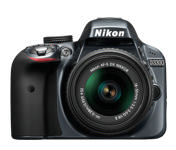
Nikon d3300

The Nikon D3300 continues on the path of its entry-level DSLR predecessors, with plenty of built-in shooting and retouch modes, a small footprint, and beginner-friendly user interface. It has a 24.2 megapixel CMOS sensor with no optical low-pass filter, as well as an Expeed 4 image processor. The camera's ISO range tops out at 25,600 and continuous shooting up to 5 fps. The D3300 can also record 1080/60p full HD video. A newly redesigned collapsible, 18-55mm F3.5-5.6 VR II kit lens comes with the D3300. Optional wireless sharing to smartphones or tablets can be accomplished via Nikon's WU-1a module or an Eye-Fi SD card.
- Height: 0 cm
- Depth: 0 cm
- Width: 0 cm
- Weight: 0 kg
Variants
VariantInfo
All products have a VariantInfo property, which contains a tree of variant dimensions accessible via nested VariantInfo models; Model.VariantInfo.VariantInfo contains a list of level 1 variant options, and each of these variants options contain a list of level 2 variants, and so on. You also have access to prices, including PriceMin and PriceMax values for the nodes under the current level.
If this product has variants, you can fold out the variant tree below. The 'Variant - Add to Cart' section allows you to add a specific variant to cart.
- Image:
- Price
- PriceFormatted: $268.00
- PriceWithoutVatFormatted: $268.00
- PriceWithVatFormatted: $268.00
- PriceMax:
- PriceFormatted: $268.00
- PriceWithoutVatFormatted: $268.00
- PriceWithVatFormatted: $268.00
- PriceMin:
- PriceFormatted: $268.00
- PriceWithoutVatFormatted: $268.00
- PriceWithVatFormatted: $268.00
- ProductId: PROD12
- ProductName: Nikon d3300
- Stock: 9974
- VariantID:
- This product has no variants
Discounts
The ProductViewModel has a property - ProductDiscounts - which returns a collection of product discounts which are active for this product.
Prices
- Price: 268
- PriceFormatted: $268.00
- PriceWithoutVat: 268
- PriceWithoutVatFormatted: $268.00
- ShowPricesWithVat: True
- PriceWithVat: 268
- PriceWithVatFormatted: $268.00
- Vat: 0
- VatFormatted: $0.00
- VATPercent: 0
- VATPercentFormatted: 0%
- No informative price set
- PriceBeforeDiscount is equal to the base price, implying that no discount is applied.
Units & Stock
Stock Units
Stock States
-
State: <= 0
- Text: Out of stock
- Delivery: 2 weeks
- Language ID: LANG1
- ID: LANGUAGEVALUE5
- Text: Few in stock
- Delivery: -
- Language ID: LANG1
- ID: LANGUAGEVALUE6
- Text: In Stock
- Delivery: -
- Language ID: LANG1
- ID: LANGUAGEVALUE4
Manufacturer
This product does not have a manufacturer set.Images & Assets
Default Image
ImagePatternImages
The ImagePatternImages contains a list of images based on alternative image patterns defined for the context, typically the shop or another channel.
Asset Categories
Asset Categories are available on the model, and you can render them in various ways. Links are a bit tricky, you probably want to fetch a label and a value
Images

Field Display Groups
As of 9.12, Field Display Groups are available on the ProductViewModel. They must have the flag 'Use in frontend' set, of course.
- ID: Frontend_Field_Display_Group_Example
- Fields:
- ProductActive: True
- ProductName: Nikon d3300
- ProductStock: 9974
- ProductVolume: 0
- ProductWeight: System.Collections.Generic.List`1[Dynamicweb.Ecommerce.ProductCatalog.FieldOptionValueViewModel]